1、三层交换机实现不同vlan间的访问
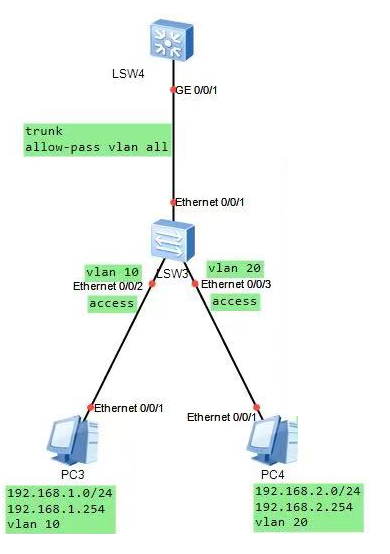
sw4配置
sysname SW4
vlan batch 18 20
interface Vlanif10
    ip address 192.168.1.1 255.255.255.0
interface Vlanif20
    ip address 192.168.2.1 255.255.255.0
interface GigabitEthernet0/0/1
    port link type trunk
    port trunk allow-pass vlan 2 to 4094
三层交换机也是交换机,所以sw4的60/0/1口和sw3的E0/0/1接口一样,要配置成trunk,并允许vlan通过
Sw3配置
sysname SW3
vlan batch 10 20
interface Ethernet0/0/1
    port link type trunk
    port trunk allow-pass vlan2 to 4094
interface Ethernet0/0/2
    port link-type access
    port default vlan 10
interface Ethernet0/0/3
    port link-type access
    port default vlan 20
2、单臂路由
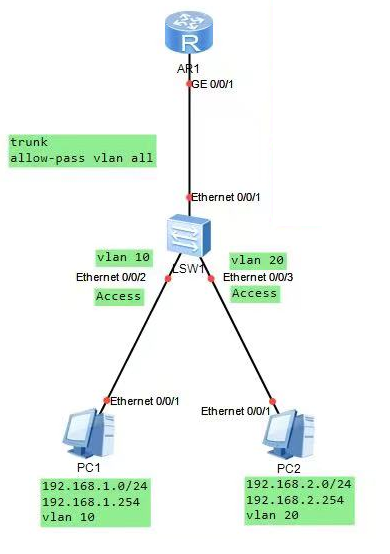
子接口依托在G0/0/1接口下,故要开启G0/0/1接
1、打开子接口
2、封装dot1q针对某vlan
3、配置wlan网关地址
4、打开arp广播消息
R1的配置
sysname R1
interface GigabitEthernet0/0/1.10
    dotlq termination vid 10
    ip address 192.168.1.1 255.255.255.0
    arp broadcast enable
interface GigabitEthernet0/0/1.20
    dotlg termination vid 20
    ip address 192.168.2.1 255.255.255.0
    arp broadcast enable
sw1的配置
sysname SW1
vlan batch 10 20
interface Ethernet0/0/1
    port link-type trunk
    port trunk allow-pass vlan 2 to 4094
interface Ethernet0/0/2
    port link-type access
    port default vlan 10
interface Ethernet0/0/3
    port link-type access
    port default vlan 20
3、浮动静态路由与BFD绑定
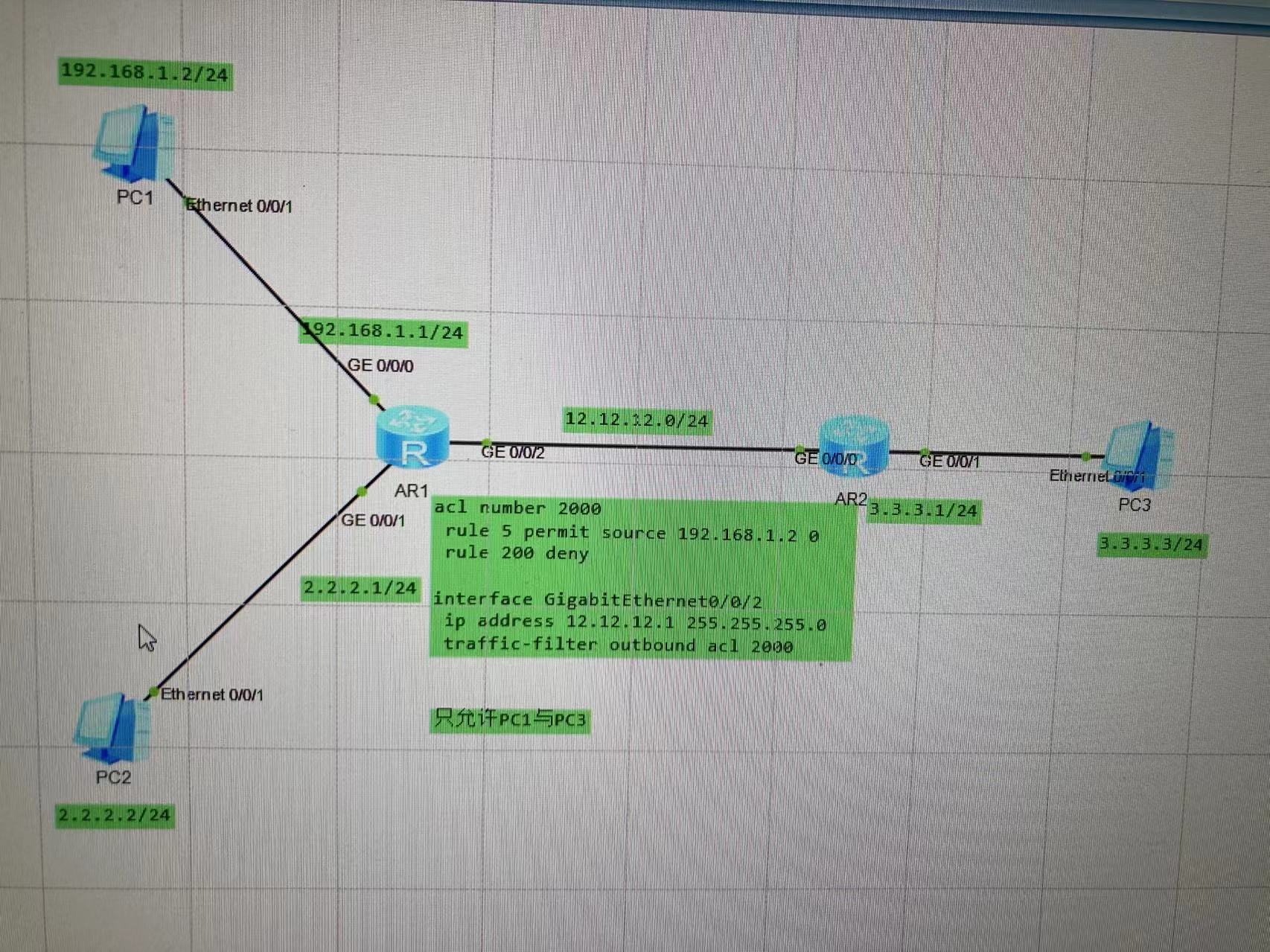
4、acl应用
5、VRRP实验
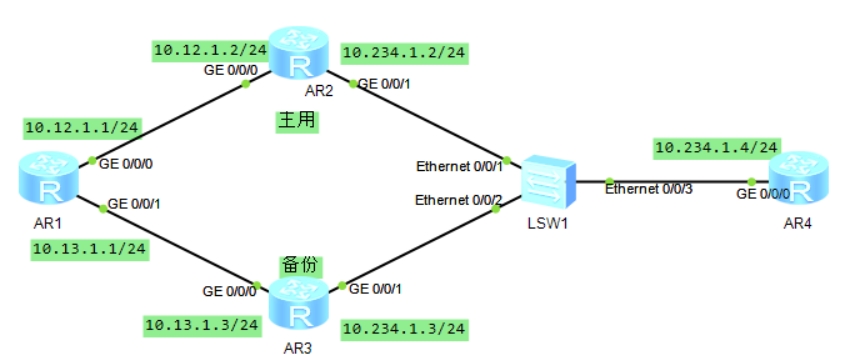
AR1的配置
bfd
interface GigabitEthernet0/0/0
 ip address 10.12.1.1 255.255.255.0
#
interface GigabitEthernet0/0/1
 ip address 10.13.1.1 255.255.255.0

quit
bfd 12 bind peer-ip 10.12.1.2 interface GigabitEthernet0/0/0 one-arm-echo
 discriminator local 1
 commit
#
ip route-static 10.234.1.0 255.255.255.0 10.12.1.2 track bfd-session 12
ip route-static 10.234.1.0 255.255.255.0 10.13.1.3 preference 61   #如果不加preference 80,即为负载分担
AR2的配置
interface GigabitEthernet0/0/0
 ip address 10.12.1.2 255.255.255.0
interface GigabitEthernet0/0/1
 ip address 10.234.1.2 255.255.255.0
AR3的配置
interface GigabitEthernet0/0/0
 ip address 10.13.1.3 255.255.255.0
#
interface GigabitEthernet0/0/1
 ip address 10.234.1.3 255.255.255.0
AR4的配置
interface GigabitEthernet0/0/0
 ip address 10.234.1.4 255.255.255.0
6、GRE基础实现
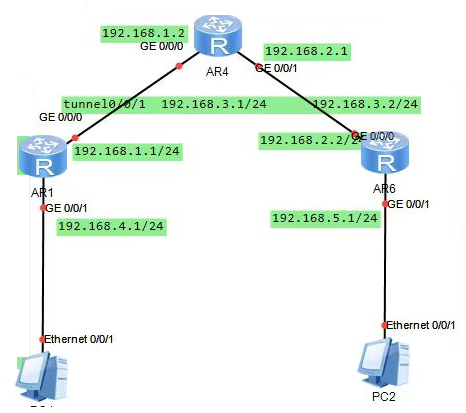
AR1配置
interface GigabitEthernet0/0/0
    ip address 192.168.1.1 255.255.255.0
interface GigabitEthernet0/0/1
    ip address 192.168 4.1 255.255.255.0
    dhcp select interface
interface Tunnel0/0/1
    ip address 192.168.3.1 255.255.255.0
    tunnel-protocol gre
    keepalive
    source 192.168.1.1
    destination 192.168.2.2

ip route-static 192.168.2.0 255.255.255.0 192.168.1.2
ip route-static 192.168.5.0 255.255.255.0 Tunne10/0/1
AR4的配置
interface GigabitEthernet0/0/0
    ip address 192.168.1.2 255.255.255.0
interface GigabitEthernet0/0/1
    ip address 192.168.2.1 255.255.255.0
AR6配置
interface GigabitEthernet0/0/0
    ip address 192.168.2.2 255.255.255.0
interface GigabitEthernet0/0/1
    ip address 192.168.5.1 255.255.255.0
    dhcp select interface
interface Tunnel0/0/1
    ip address 192.168.3.2 255.255.255.0
    tunnel-protocol gre
    keepalive
    source 192.168.2.2
    destination 192.168.1.1

ip route static 192.168.1.0 255.255.255.0 192.168.2.1
ip route-static 192.168.4.0 255.255.255.0 Tunne10/0/1
评论已关闭